
Taobao is China’s largest C2C online marketplace, known for its wide product selection, competitive prices, and trend-driven shopping experience. While primarily serving Chinese consumers, Taobao supports international shipping to select countries, offering both consolidation and direct shipping services. Additionally, Taobao provides an English interface, making it easy for global buyers to purchase products.
If you’re looking to buy from Taobao, this guide will walk you through the steps, from creating an account to receiving your purchase, ensuring a seamless shopping experience.
This guide also applies to Tmall, as Taobao and Tmall share the same account system.
Step 1: Create a Taobao Account
To begin shopping on Taobao, you first need to create an account. Here’s how:- Visit Taobao’s Website: Open Taobao on your browser (www.taobao.com) or download the Taobao app on your mobile device.
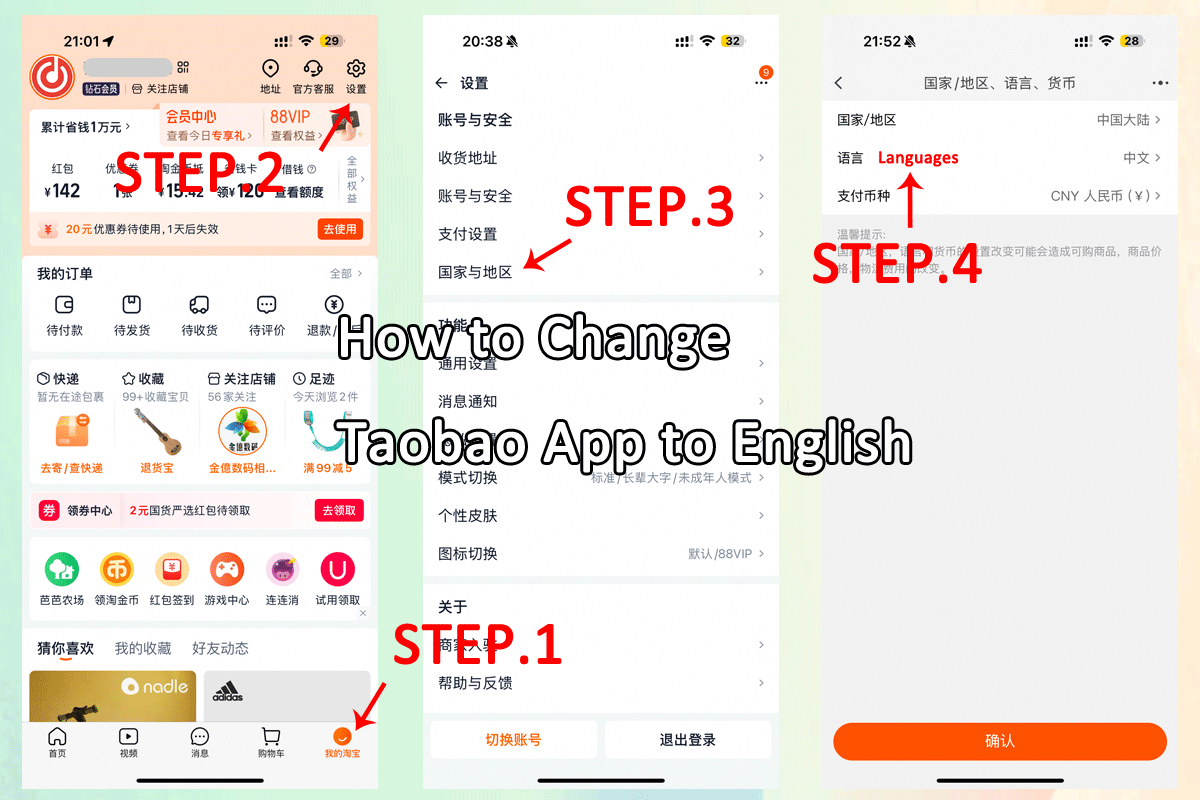
- Set Language Preferences: Taobao supports both Chinese and English. Based on your language preference, you can set it on the website by selecting the language at the top left corner of the page. On the app, go to My Taobao (我的淘宝) > Settings (设置: top right) > Country and Region/Language and Region to set your preferred language.
- Sign Up: If you don’t already have an account, click on the “Sign Up” button. You will be asked to provide your phone number to register. Taobao will send you a verification code, which you will need to enter to complete the registration.

Step 2: Browsing and Searching for Products
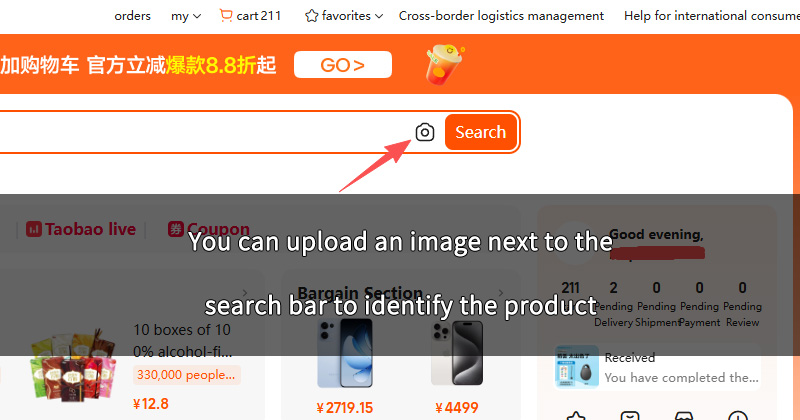
Once you’re logged in, you can start browsing Taobao to find products. Use the search bar at the top of the page to enter keywords or product names to find what you’re looking for. Taobao offers a wide variety of products, and it also supports image recognition. You can upload an image next to the search bar to identify the product.
If you’re not familiar with Chinese, you can use Google Translate or ChatGPT to help you with translations.
Step 3: Selecting a Seller
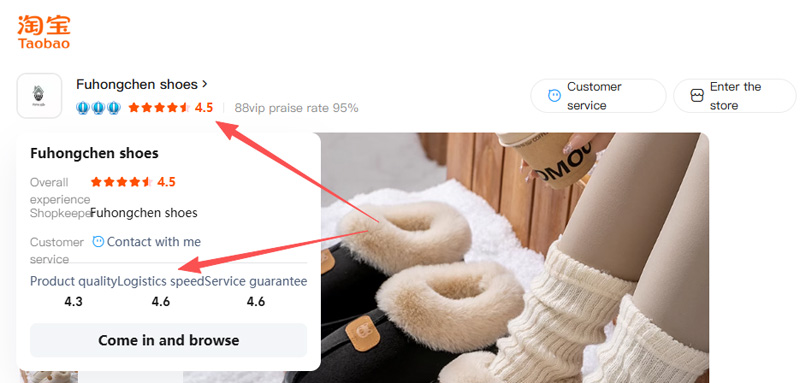
When you find a product you’re interested in, check the seller’s ratings and reviews. Just like any other marketplace, Taobao sellers have ratings based on customer feedback. It’s a good idea to pick sellers with high ratings and positive reviews to ensure a reliable shopping experience.
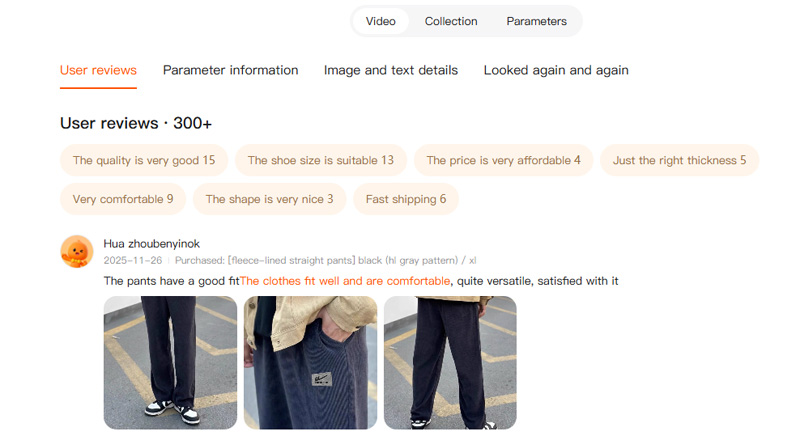
- Product Ratings: Read the feedback from previous buyers to gauge the quality of the product and customer service.
- Shipping and Returns: Verify the shipping options, estimated delivery times, and the store’s return policy.
Step 4: Contact and Communicate with Sellers
If you have any questions about a product or need additional details, you can easily contact the seller directly on both the website and the app. Here’s how to do it:
- On the Website: Go to the product page and click on the “Customer service” button (usually located at the top or right of the product page) to send a message.
- On the App: In the product page, tap on the “Chat” button to start a conversation with the seller. This feature is useful for asking about product specifications, shipping times, or custom requests.
Step 5: Add to Cart
Once you’ve selected your items, you can add them to your shopping cart:
- Add to Cart: When you’re on the product page, click the “Add to Cart” button to include the item in your shopping cart.
- Review Your Cart: Once you’re done shopping, click on your cart icon to review your items. Ensure that everything is correct before proceeding to checkout.
Step 6: International Shipping
Taobao supports international shipping to select countries, allowing international buyers to have products delivered directly or through consolidation services. Here’s how it works:
- Add Your Shipping Address: Before proceeding with your purchase, make sure to add your international shipping address in Taobao’s settings. You can do this by going to “My Taobao” > “Address Management” and entering your address information for shipping.
- Direct Shipping: For certain countries, Taobao offers direct shipping, meaning your items can be shipped directly from the seller to your international address.
- Consolidation Services: If direct shipping is not available, third-party shipping services can act as a bridge. Popular services like Superbuy, and CSSbuy provide you with a local address in China. Once your items arrive at the local address, they will forward your packages to your international address.
- Shipping Costs and Customs: Be sure to check the shipping costs and possible customs duties. Each shipping service will have different rates and delivery times, so it’s important to consider these when making your purchase.
Step 7: Choose a Payment Method and Checkout
Taobao supports various payment methods, including Alipay, WeChat Pay, and UnionPay, which are the most common options. For international buyers, here are the most popular options:
- Alipay: This is the Chinese payment platform linked to Taobao. You can create an Alipay account and link it to your bank account or credit card.
- WeChat Pay: Another widely used payment method in China. You can link your WeChat account to make payments on Taobao.
- UnionPay: UnionPay is a popular payment method in China, and it supports international credit cards as well.
- Proceed to Payment: Click on the “Checkout” button to begin the payment process.
Step 8: Track Your Package and Receive It
Once the items are shipped from Taobao to the third-party service, you will receive tracking details. Depending on the shipping method and the destination country, the delivery time may range from a few days to a few weeks.
Track your package using the tracking number provided by the shipping service, and once it arrives, you can receive it at your local address.
Tips for Shopping on Taobao:
- Use Translation Tools: Although Taobao has both Chinese and English interfaces, many product descriptions are still in Chinese. Using Google Translate or other translation tools can help you navigate product details more easily.
- Check for International Shipping: Some sellers offer direct international shipping. Be sure to check the shipping details on the product page to confirm if they can ship to your country.
- Verify Product Authenticity: Some sellers may offer counterfeit products. Always check reviews, ratings, and the seller’s credibility to ensure you’re buying from a trustworthy source.
Conclusion
Buying from Taobao can be a fantastic way to access a wide range of products from China, but it’s important to understand the process and take precautions to ensure a smooth shopping experience. From setting up an account to managing shipping, this guide covers the essential steps to successfully shop on Taobao. Happy shopping!
We keep improving this guide to provide the latest and most helpful information for global shoppers.
